Batch inference#


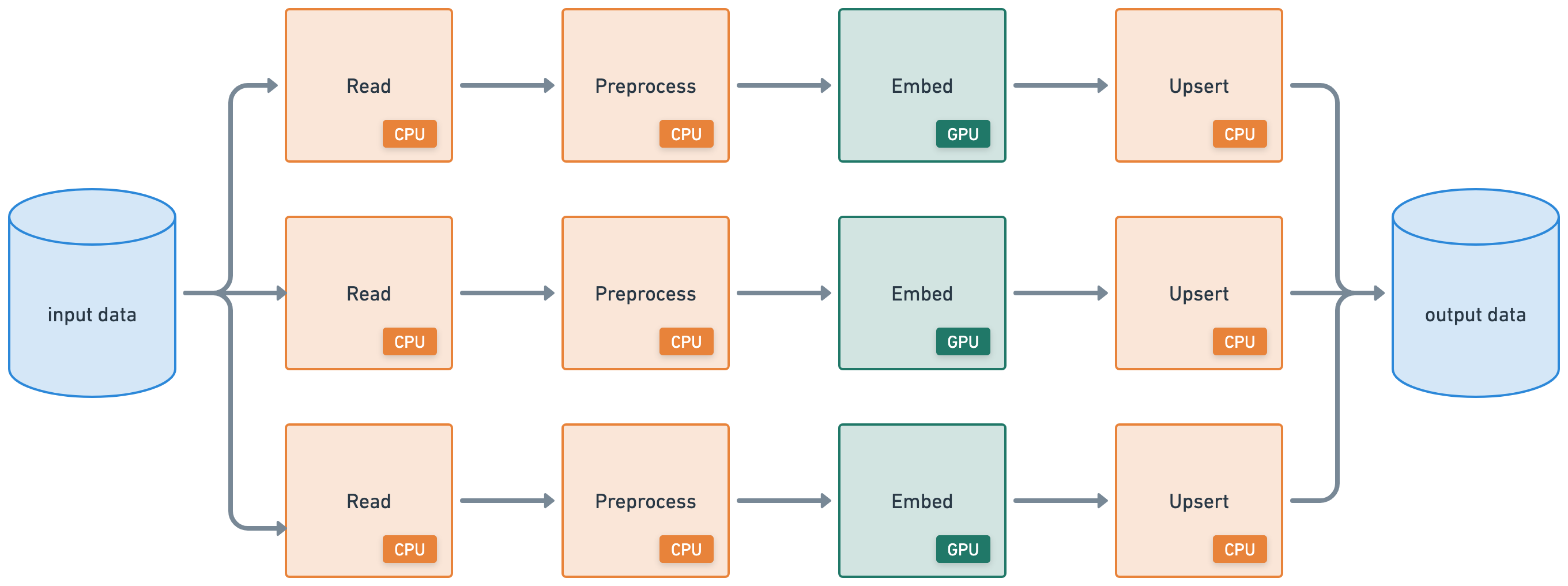
This tutorial executes a batch inference workload that connects the following heterogeneous workloads:
distributed read from cloud storage (CPU)
apply distributed preprocessing (CPU)
batch inference (GPU)
distributed write to cloud storage (CPU)
%%bash
pip install -q -r /home/ray/default/requirements.txt
pip install -q -e /home/ray/default/doggos
Successfully registered `ipywidgets, matplotlib` and 4 other packages to be installed on all cluster nodes.
View and update dependencies here: https://console.anyscale.com/cld_kvedZWag2qA8i5BjxUevf5i7/prj_cz951f43jjdybtzkx1s5sjgz99/workspaces/expwrk_1dp3fa7w5hu3i83ldsi7lqvp9t?workspace-tab=dependencies
Successfully registered `doggos` package to be installed on all cluster nodes.
View and update dependencies here: https://console.anyscale.com/cld_kvedZWag2qA8i5BjxUevf5i7/prj_cz951f43jjdybtzkx1s5sjgz99/workspaces/expwrk_1dp3fa7w5hu3i83ldsi7lqvp9t?workspace-tab=dependencies
Note: A kernel restart may be required for all dependencies to become available.
If using uv, then:
Turn off the runtime dependencies (
Dependenciestab up top > Toggle offPip packages). And no need to run thepip installcommands above.Change the python kernel of this notebook to use the
venv(Click onbase (Python x.yy.zz)on top right cordern of notebook >Select another Kernel>Python Environments...>Create Python Environment>Venv>Use Existing) and done! Now all the notebook’s cells will use the virtual env.Change the py executable to use
uv runinstead ofpythonby adding this line after importing ray.
import os
os.environ.pop("RAY_RUNTIME_ENV_HOOK", None)
import ray
ray.init(runtime_env={"py_executable": "uv run", "working_dir": "/home/ray/default"})
%load_ext autoreload
%autoreload all
import os
import ray
import sys

sys.path.append(os.path.abspath("../doggos/"))
# If using UV
# os.environ.pop("RAY_RUNTIME_ENV_HOOK", None)
# ray.init(runtime_env={"py_executable": "uv run", "working_dir": "/home/ray/default"})
from doggos import utils