Data ingestion#
Start by reading the data from a public cloud storage bucket.
# Load data.
ds = ray.data.read_images(
    "s3://doggos-dataset/train",
    include_paths=True,
    shuffle="files",
)
ds.take(1)
[{'image': array([[[123, 118,  78],
          [125, 120,  80],
          [128, 120,  83],
          ...,
          [162, 128,  83],
          [162, 128,  83],
          [161, 127,  82]],

         [[123, 118,  78],
          [125, 120,  80],
          [127, 119,  82],
          ...,
          [162, 128,  83],
          [162, 128,  83],
          [161, 127,  82]],

         [[123, 118,  78],
          [125, 120,  80],
          [127, 119,  82],
          ...,
          [161, 128,  83],
          [161, 128,  83],
          [160, 127,  82]],

         ...,

         [[235, 234, 239],
          [233, 232, 237],
          [221, 220, 225],
          ...,
          [158,  95,  54],
          [150,  85,  53],
          [151,  88,  57]],

         [[219, 220, 222],
          [227, 228, 230],
          [222, 223, 225],
          ...,
          [153,  91,  54],
          [146,  83,  52],
          [149,  88,  59]],

         [[213, 217, 216],
          [217, 221, 220],
          [213, 214, 216],
          ...,
          [153,  91,  54],
          [144,  83,  54],
          [149,  88,  60]]], dtype=uint8),
  'path': 'doggos-dataset/train/border_collie/border_collie_1055.jpg'}]
Ray Data supports a wide range of data sources for both loading and saving from generic binary files in cloud storage to structured data formats used by modern data platforms. This example reads data from a public S3 bucket prepared with the dataset. This read operation, much like the write operation in a later step, runs in a distributed fashion. As a result, Ray Data processes the data in parallel across the cluster and doesn’t need to load the data entirely into memory at once, making data loading scalable and memory-efficient.
trigger lazy execution: use
taketo trigger the execution because Ray has lazy execution mode, which decreases execution time and memory utilization. But, this approach means that you need an operation like take, count, write, etc., to actually execute the workflow DAG.shuffling strategies: to shuffle the dataset because it’s all ordered by class, randomly shuffle the ordering of input files before reading. Ray Data also provides an extensive list of shuffling strategies such as local shuffles, per-epoch shuffles, etc.
materializeduring development: usematerializeto execute and materialize the dataset into Ray’s shared memory object store memory. This way, you save a checkpoint at this point and future operations on the dataset can start from this point. You won’t rerun all operations on the dataset again from scratch. This feature is convenient during development, especially in a stateful environment like Jupyter notebooks, because you can run from saved checkpoints.ds = ds.map(...) ds = ds.materialize()
Note: only use this during development and use it with small datasets, as it will load it all into memory.
You also want to add the class for each data point. When reading the data with include_paths Ray Data saves the filename with each data point. The filename has the class label in it so add that to each data point’s row. Use Ray Data’s map function to apply the function to each row.
def add_class(row):
    row["class"] = row["path"].rsplit("/", 3)[-2]
    return row
# Add class.
ds = ds.map(add_class, num_cpus=1, num_gpus=0, concurrency=4)
❌ Traditional batch execution, for example, non-streaming like Spark without pipelining, SageMaker Batch Transform:
Reads the entire dataset into memory or a persistent intermediate format.
Only then starts applying transformations like .map, .filter, etc.
Higher memory pressure and startup latency.
✅ Streaming execution with Ray Data:
Starts processing chunks (“blocks”) as they’re loaded. No need to wait for entire dataset to load.
Reduces memory footprint (no OOMs) and speeds up time to first output.
Increase resource utilization by reducing idle time.
Online-style inference pipelines with minimal latency.
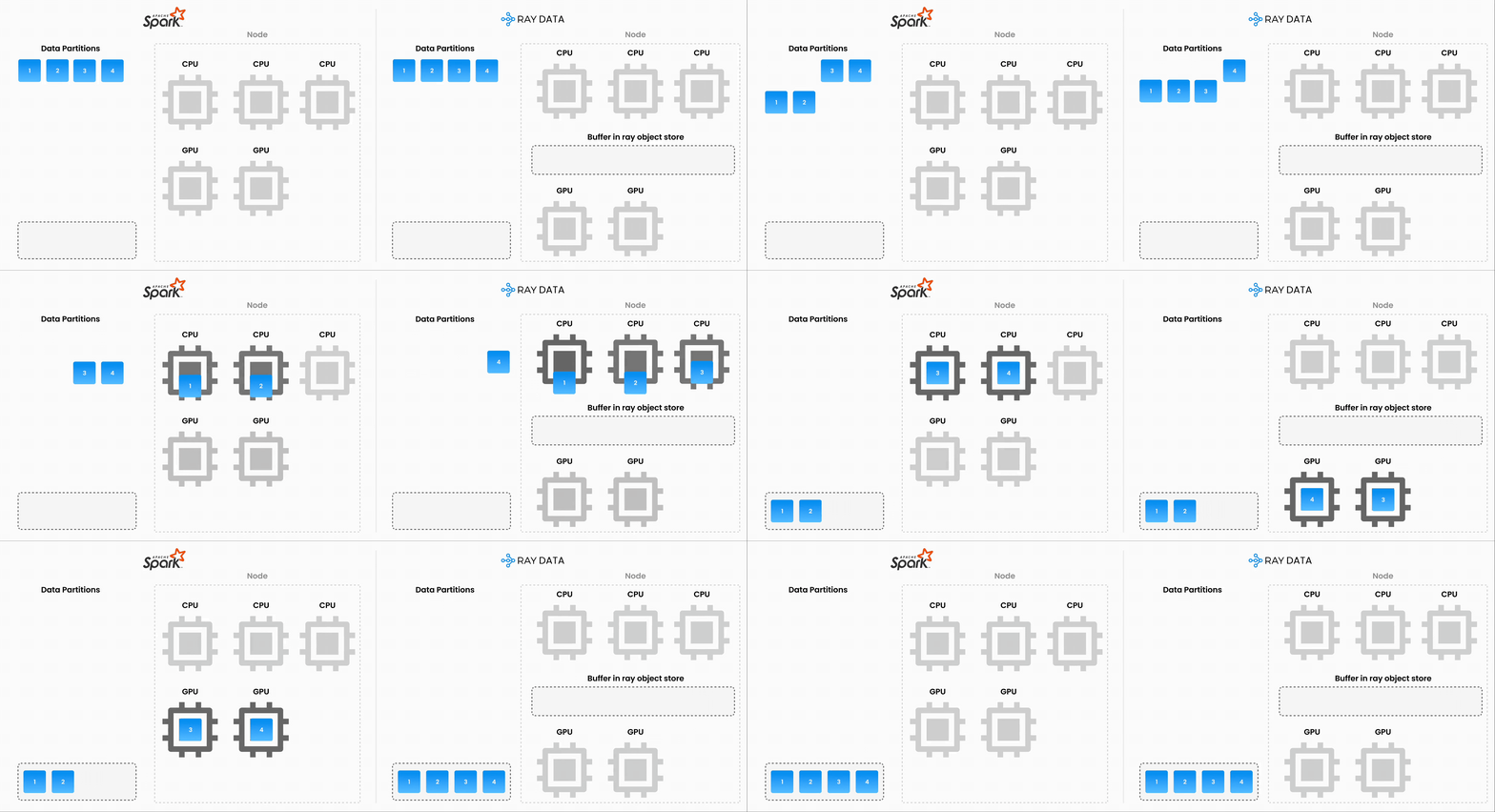
Note: Ray Data isn’t a real-time stream processing engine like Flink or Kafka Streams. Instead, it’s batch processing with streaming execution, which is especially useful for iterative ML workloads, ETL pipelines, and preprocessing before training or inference. Ray typically has a 2-17x throughput improvement over solutions like Spark and SageMaker Batch Transform, etc.