3. Hyperparameter tuning with Ray Tune#
Intro to Ray Tune#
Tune is a Python library for experiment execution and hyperparameter tuning at any scale.
Let’s take a look at a very simple example of how to use Ray Tune to tune the hyperparameters of our XGBoost model.
Getting started#
We start by defining our training function
def my_simple_model(distance: np.ndarray, a: float) -> np.ndarray:
    return distance * a

# Step 1: Define the training function
def train_my_simple_model(config: dict[str, Any]) -> None: # Expected function signature for Ray Tune
    distances = np.array([0.1, 0.2, 0.3, 0.4, 0.5])
    total_amts = distances * 10

    a = config["a"]
    predictions = my_simple_model(distances, a)
    rmse = np.sqrt(np.mean((total_amts - predictions) ** 2))

    tune.report({"rmse": rmse}) # This is how we report the metric to Ray Tune
Next, we define and run the hyperparameter tuning job by following these steps:
Create a
Tunerobject (in our case namedtuner)Call
tuner.fit
# Step 2: Set up the Tuner
tuner = tune.Tuner(
    trainable=train_my_simple_model,  # Training function or class to be tuned
    param_space={
        "a": tune.randint(0, 20),  # Hyperparameter: a
    },
    tune_config=tune.TuneConfig(
        metric="rmse",  # Metric to optimize (minimize)
        mode="min",     # Minimize the metric
        num_samples=5,  # Number of samples to try
    ),
)

# Step 3: Run the Tuner and get the results
results = tuner.fit()
# Step 4: Get the best result
best_result = results.get_best_result()
best_result
best_result.config
So let’s recap what actually happened here ?
tuner = tune.Tuner(
    trainable=train_my_simple_model,  # Training function or class to be tuned
    param_space={
        "a": tune.randint(0, 20),  # Hyperparameter: a
    },
    tune_config=tune.TuneConfig(
        metric="rmse",  # Metric to optimize (minimize)
        mode="min",     # Minimize the metric
        num_samples=5,  # Number of samples to try
    ),
)

results = tuner.fit()
A Tuner accepts:
A training function or class which is specified by
trainableA search space which is specified by
param_spaceA metric to optimize which is specified by
metricand the direction of optimizationmodenum_sampleswhich correlates to the number of trials to run
tuner.fit then runs multiple trials in parallel, each with a different set of hyperparameters, and returns the best set of hyperparameters found.
Diving deeper into Ray Tune concepts#
You might be wondering:
How does the tuner allocate resources to trials?
How does it decide how to tune - i.e. which trials to run next?
e.g. A random search, or a more sophisticated search algorithm like a bayesian optimization algorithm.
How does it decide when to stop - i.e. whether to kill a trial early?
e.g. If a trial is performing poorly compared to other trials, it perhaps makes sense to stop it early (successive halving, hyperband)
It turns out that by default:
Each trial will run in a separate process and consume 1 CPU core.
Ray Tune uses a search algorithm to decide which trials to run next.
Ray Tune uses a scheduler to decide if/when to stop trials, or to prioritize certain trials over others.
Here is the same code with the default settings for Ray Tune explicitly specified.
tuner = tune.Tuner(
    # This is how to specify resources for your trainable function
    trainable=tune.with_resources(train_my_simple_model, {"cpu": 1}),
    param_space={"a": tune.randint(0, 20)},
    tune_config=tune.TuneConfig(
        mode="min",
        metric="rmse",
        num_samples=5,
        # This search algorithm is a basic variation (i.e random/grid search) based on parameter space
        search_alg=tune.search.BasicVariantGenerator(),
        # This scheduler is very simple: no early stopping, just run all trials in submission order
        scheduler=tune.schedulers.FIFOScheduler(),
    ),
)
results = tuner.fit()
Below is a diagram showing the relationship between the different Ray Tune components we have discussed.
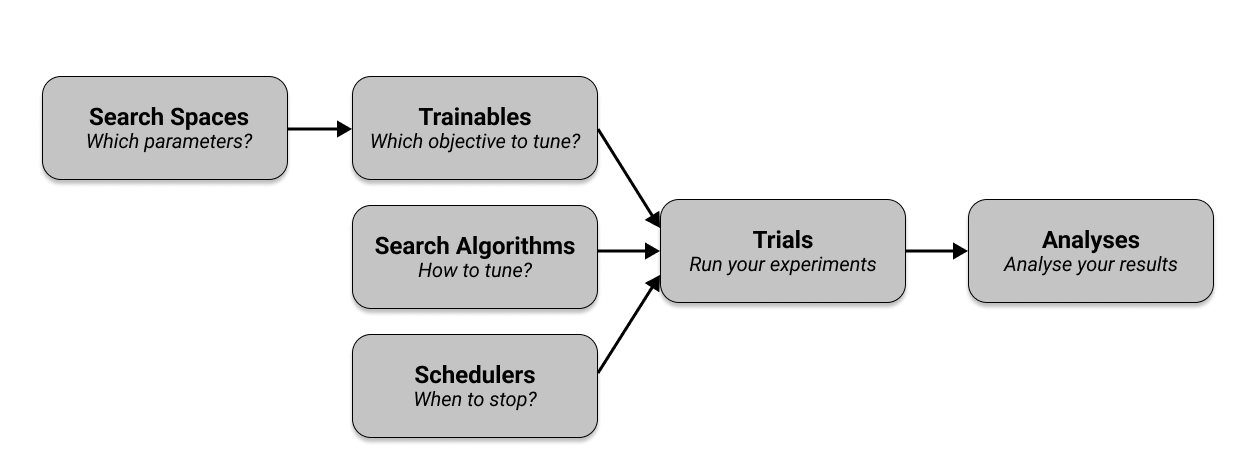
To learn more about the key tune concepts, you can visit the Ray Tune documentation here.
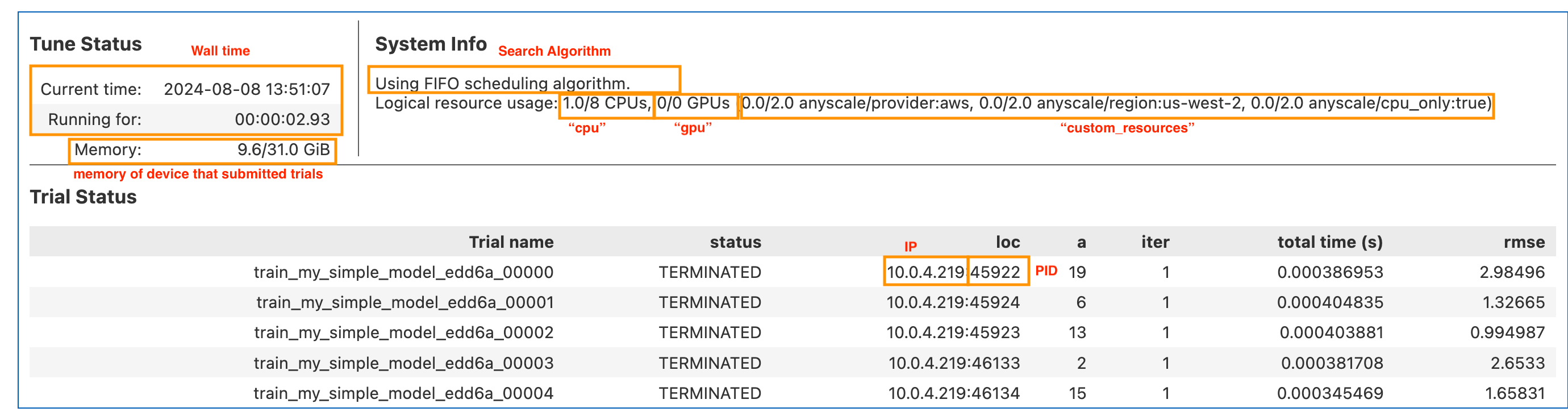
Here is the same experiment table annotated.
Exercise#
Lab activity: Finetune a linear regression model.
Given the below code to train a linear regression model from scratch:
def train_linear_model(lr: float, epochs: int) -> None:
    x = np.array([0, 1, 2, 3, 4])
    y = x * 2
    w = 0
    for _ in range(epochs):
        loss = np.sqrt(np.mean((w * x - y) ** 2))
        dl_dw = np.mean(2 * x * (w * x - y))
        w -= lr * dl_dw
        print({"rmse": loss})

# Hint: Step 1 update the function signature

# Hint: Step 2 Create the tuner object
tuner = tune.Tuner(...)

# Hint: Step 3: Run the tuner
results = tuner.fit()
Use Ray Tune to tune the hyperparameters lr and epochs.
Perform a search using the optuna.OptunaSearch search algorithm with 5 samples over the following ranges:
lr: loguniform(1e-4, 1e-1)epochs: randint(1, 100)
# Write your code here
Click here to view the solution
def train_linear_model(config) -> None:
    epochs = config["epochs"]
    lr = config["lr"]
    x = np.array([0, 1, 2, 3, 4])
    y = x * 2
    w = 0
    for _ in range(epochs):
        loss = np.sqrt(np.mean((w * x - y) ** 2))
        dl_dw = np.mean(2 * x * (w * x - y))
        w -= lr * dl_dw
        tune.report({"rmse": loss})

tuner = tune.Tuner(
    trainable=train_linear_model,  # Training function or class to be tuned
    param_space={
        "lr": tune.loguniform(1e-4, 1e-1),  # Hyperparameter: learning rate
        "epochs": tune.randint(1, 100),  # Hyperparameter: number of epochs
    },
    tune_config=tune.TuneConfig(
        metric="rmse",  # Metric to optimize (minimize)
        mode="min",     # Minimize the metric
        num_samples=5,  # Number of samples to try
        search_alg=optuna.OptunaSearch(), # Use Optuna for hyperparameter search
    ),
)

results = tuner.fit()
Hyperparameter tune the PyTorch model using Ray Tune#
The first step is to move in all the PyTorch code into a function that we can pass to the trainable argument of the tune.run function.
def train_pytorch(config): # we change the function so it accepts a config dictionary
    criterion = CrossEntropyLoss()

    model = resnet18()
    model.conv1 = torch.nn.Conv2d(
        1, 64, kernel_size=(7, 7), stride=(2, 2), padding=(3, 3), bias=False
    )
    model.to(device)

    optimizer = Adam(model.parameters(), lr=config["lr"])
    transform = Compose([ToTensor(), Normalize((0.5,), (0.5,))])
    train_data = MNIST(root="./data", train=True, download=True, transform=transform)
    # Limit the dataset to 500 samples for faster training
    train_data = torch.utils.data.Subset(train_data, range(500))
    data_loader = DataLoader(train_data, batch_size=config["batch_size"], shuffle=True, drop_last=True)

    for epoch in range(config["num_epochs"]):
        for images, labels in data_loader:
            images, labels = images.to(device), labels.to(device)
            outputs = model(images)
            loss = criterion(outputs, labels)
            optimizer.zero_grad()
            loss.backward()
            optimizer.step()

        # Report the metrics using tune.report instead of print
        tune.report({"loss": loss.item()})
The second and third steps are the same as before. We define the tuner and run it by calling the fit method.
tuner = tune.Tuner(
    tune.with_resources(train_pytorch, {"gpu": 1}), # we will dedicate 1 GPU to each trial
    param_space={
        "num_epochs": 1,
        "batch_size": 128,
        "lr": tune.loguniform(1e-4, 1e-1),
    },
    tune_config=tune.TuneConfig(
        mode="min",
        metric="loss",
        num_samples=2,
        search_alg=tune.search.BasicVariantGenerator(),
        scheduler=tune.schedulers.FIFOScheduler(),
    ),
)

results = tuner.fit()
Finally, we can get the best result and its configuration:
best_result = results.get_best_result()
best_result.config