11 · Save Checkpoints and Report Metrics#
We will report intermediate metrics and checkpoints using the ray.train.report utility function.
This helper function:
Creates a temporary directory to stage the checkpoint.
Saves the model weights with
torch.save().Since the model is wrapped in DistributedDataParallel (DDP), we call
model.module.state_dict()to unwrap it.
Calls
ray.train.report()to:Log the current metrics (e.g., loss, epoch).
Attach a
Checkpointobject created from the staged directory.
This way, each epoch produces both metrics for monitoring and a checkpoint for recovery or inference.
# 11. Save checkpoint and report metrics with Ray Train

def save_checkpoint_and_metrics_ray_train(model: torch.nn.Module, metrics: dict[str, float]) -> None:
    # Create a temporary directory to stage checkpoint files
    with tempfile.TemporaryDirectory() as temp_checkpoint_dir:
        # Save the model weights.
        # Note: under DDP the model is wrapped in DistributedDataParallel,
        # so we unwrap it with `.module` before calling state_dict().
        torch.save(
            model.module.state_dict(),  # note the `.module` to unwrap the DistributedDataParallel
            os.path.join(temp_checkpoint_dir, "model.pt"),
        )

        # Report metrics and attach a checkpoint to Ray Train.
        # → metrics are logged centrally
        # → checkpoint allows resuming training or running inference later
        ray.train.report(
            metrics,
            checkpoint=ray.train.Checkpoint.from_directory(temp_checkpoint_dir),
        )
Quick notes:
- Use ray.train.report to save the metrics and checkpoint.
- Only metrics from the rank 0 worker are reported.
Note on the Checkpoint Lifecycle#
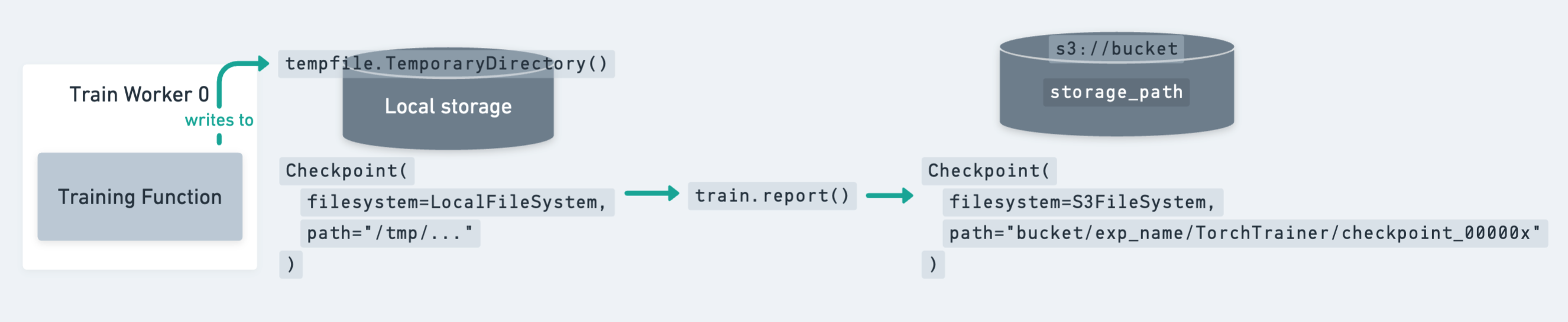
The diagram above shows how a checkpoint moves from local storage (temporary directory on a worker) to persistent cluster or cloud storage.
Key points to remember:
Since the model is identical across all workers, it’s enough to write the checkpoint only on the rank-0 worker.
However, you still need to call
ray.train.reporton all workers to keep the training loop synchronized.
Ray Train expects every worker to have access to the same persistent storage location for writing files.
For production jobs, cloud storage (e.g., S3, GCS, Azure Blob) is the recommended target for checkpoints.
12 · Save Checkpoints on Rank-0 Only#
To avoid redundant writes, we update the checkpointing function so that only the rank-0 worker saves the model weights.
Temporary directory → Each worker still creates a temp directory, but only rank-0 writes the model file.
Rank check →
ray.train.get_context().get_world_rank()ensures that only worker 0 performs the checkpointing.All workers report → Every worker still calls
ray.train.report, but only rank-0 attaches the actual checkpoint. This keeps the training loop synchronized.
This pattern is the recommended best practice:
Avoids unnecessary duplicate checkpoints from multiple workers.
Still guarantees that metrics are reported from every worker.
Ensures checkpoints are cleanly written once per epoch to persistent storage.
# 12. Save checkpoint only from the rank-0 worker

def save_checkpoint_and_metrics_ray_train(model: torch.nn.Module, metrics: dict[str, float]) -> None:
    with tempfile.TemporaryDirectory() as temp_checkpoint_dir:
        checkpoint = None

        # Only the rank-0 worker writes the checkpoint file
        if ray.train.get_context().get_world_rank() == 0:
            torch.save(
                model.module.state_dict(),  # unwrap DDP before saving
                os.path.join(temp_checkpoint_dir, "model.pt"),
            )
            checkpoint = ray.train.Checkpoint.from_directory(temp_checkpoint_dir)

        # All workers still call ray.train.report()
        # → keeps training loop synchronized
        # → metrics are logged from each worker
        # → only rank-0 attaches a checkpoint
        ray.train.report(
            metrics,
            checkpoint=checkpoint,
        )
Check our guide on saving and loading checkpoints for more details and best practices.
13 · Configure Persistent Storage with RunConfig#
To tell Ray Train where to store results, checkpoints, and logs, we use a RunConfig.
storage_path→ Base directory for all outputs of this training run.In this example we use
/mnt/cluster_storage/training/, which is persistent shared storage across all nodes.This ensures checkpoints and metrics remain available even after the cluster shuts down.
name→ A human-readable name for the run (e.g.,"distributed-mnist-resnet18"). This is used to namespace output files.
Together, the RunConfig defines how Ray organizes and persists all artifacts from your training job.
# 13. Configure persistent storage and run name

storage_path = "/mnt/cluster_storage/training/"
run_config = RunConfig(
    storage_path=storage_path,         # where to store checkpoints/logs
    name="distributed-mnist-resnet18"  # identifier for this run
)
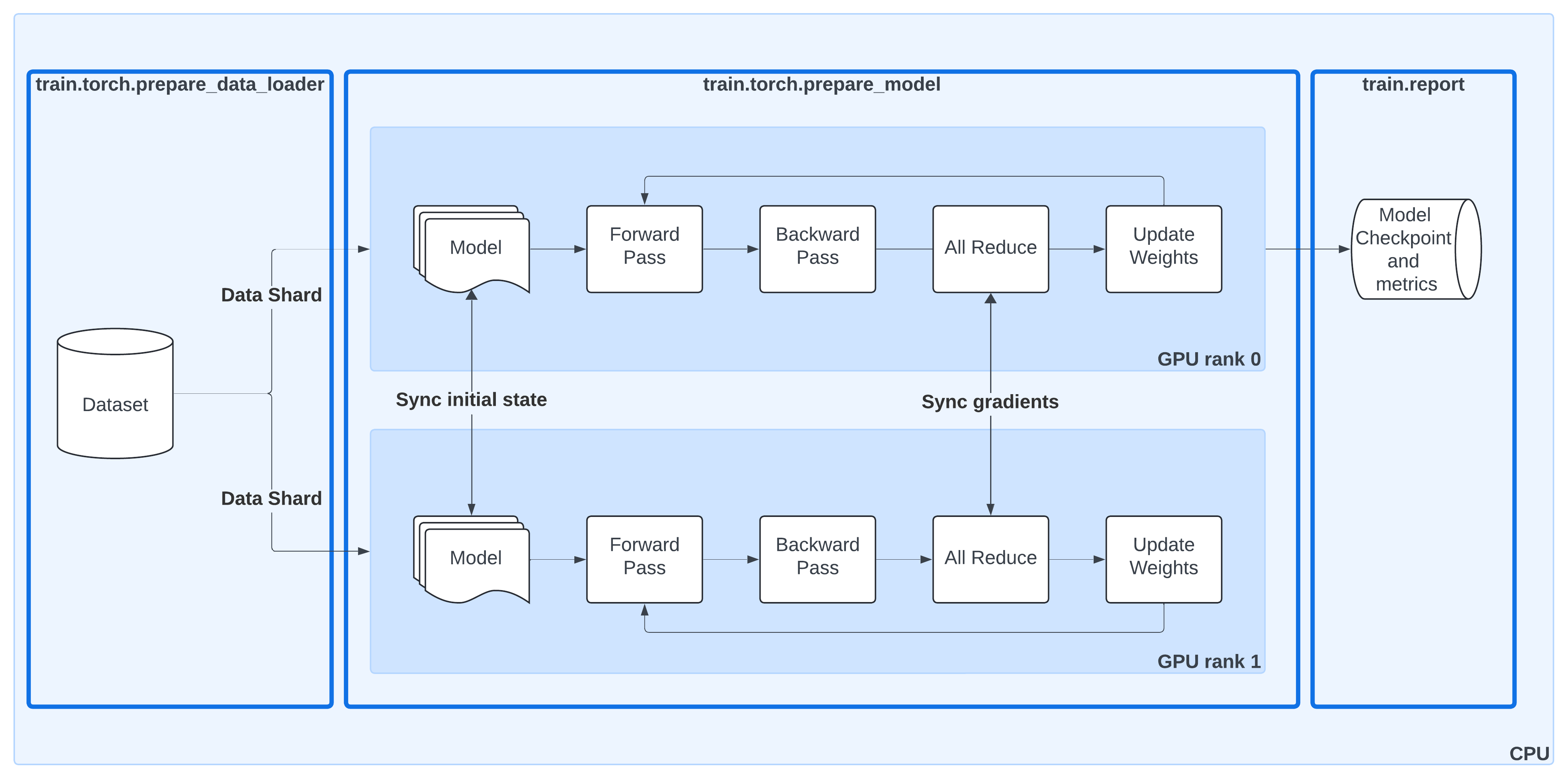
Distributed Data-Parallel Training with Ray Train#
This diagram shows the same DDP workflow as before, but now with Ray Train utilities highlighted:
ray.train.torch.prepare_data_loader()Automatically wraps your PyTorch DataLoader with a
DistributedSampler.Ensures each worker processes a unique shard of the dataset.
Moves batches to the correct device (GPU or CPU).
ray.train.torch.prepare_model()Moves your model to the right device.
Wraps it in
DistributedDataParallel (DDP)so gradients are synchronized across workers.Removes the need for manual
.to("cuda")calls or DDP boilerplate.
ray.train.report()Centralized way to report metrics and attach checkpoints.
Keeps the training loop synchronized across all workers, even if only rank-0 saves the actual checkpoint.
By combining these helpers, Ray Train takes care of the data sharding, model replication, gradient synchronization, and checkpoint lifecycle — letting you keep your training loop clean and close to standard PyTorch.
|
|---|